How to Buy and Sell Tokens Manually with Quickscope
Use the terminal without following a trader: discover a token, review a buy, sell a selected position, and check confirmed results.
You can use Quickscope to buy and sell supported tokens manually without copying a FOMO trader. The terminal combines token discovery, charts, live swaps, tracked holders, positions and orders. Manual trades execute through your funded Quickscope account on Robinhood Chain.
Sign in and fund the right account
Open Quickscope and sign in with your wallet. If the private beta gate is enabled, complete the access flow first. Your wallet owns a separate smart account; fund it through Account with USDG on Robinhood Chain. A balance on a different network is not automatically available to trade here.
Review available cash and token spending limits in Account. Open buy orders can reserve part of your USDG balance, and account fees can reduce the amount available for a new buy. A wallet connection alone does not fund the smart account.
Find a token and inspect its market
Open Trending and use token discovery to select a market. Check the chain and token contract address, especially when different tokens share a symbol. A token being visible in discovery does not prove it has a supported execution route.
Inspect the chart, Live swaps and Tracked holders before making your decision. Chart prices and estimates can change and are not promised execution prices. The Orders tab on the token page shows that token's individual orders and applicable copy exit rules.
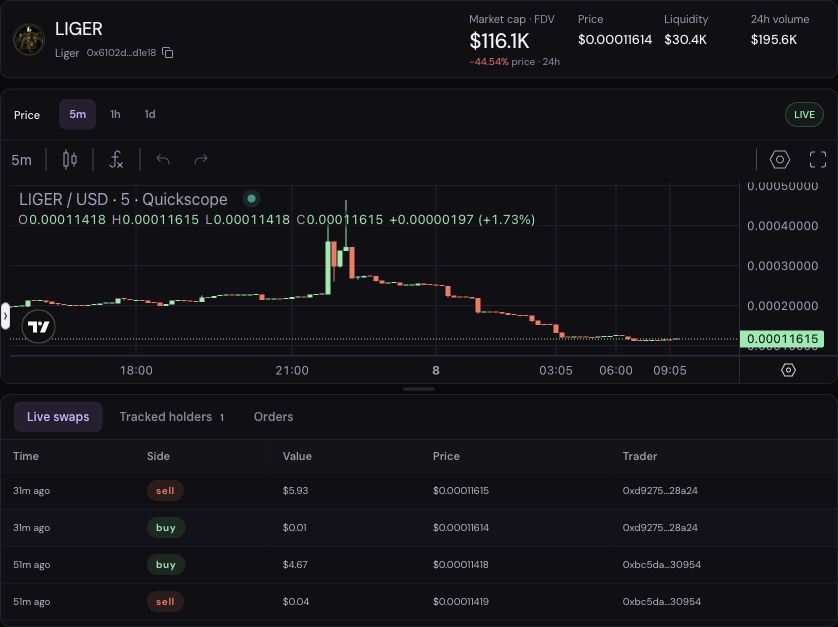
This is an interface screenshot, not a recommendation to trade the displayed token or evidence of trading performance.
Review a manual buy
Choose Buy in the token trading panel. Enter an amount in USDG and review the slippage setting. The current manual buy form accepts an amount between 1 and 500 USDG, subject to your available balance and token limits.
Use the review step to check the token, chain, amount and execution settings before submitting. Submitting creates a trade request; it is not a confirmed fill. Follow its status and check the resulting position after execution. If the app cannot confirm the result, check the existing request before placing another buy.
You do not need an active copy subscription for a manual buy. It is recorded separately from positions copied from a trader.
Sell the position you intend to close
Choose Sell on the token page. If you own the token through more than one source, choose the appropriate position. A manual holding and a holding copied from a trader are separate positions even when they contain the same token.
Enter a token amount or choose a percentage preset. Review the amount before submitting; choosing 100% closes the selected position if execution succeeds. Smaller quantities leave the remainder running. Selling converts through a supported trading route; withdrawing a token simply transfers it and is a different action.
Check the confirmed result in your position and activity history. Do not interpret a pending request, displayed estimate or changing chart as proof that the sale has filled.
Place an order for a price condition
To wait for a price condition instead of submitting a buy or sell now, use Orders → Create order on the token page or Portfolio. Limit buys trigger at or below their price; limit sells and take profits at or above; stop losses at or below. Prices in the individual-order form are USDG per token.
Individual sell orders close the selected full position. Copy subscription rules offer additional sell-size choices and use percentage thresholds from weighted entry. Read the take-profit, stop-loss and limit orders guide for the complete workflow.
If a trade cannot execute
Check the selected chain, route support, available funds, account/token caps, liquidity and any existing request for the same position. A slippage limit protects against a worse accepted fill but can also cause a trade to fail when prices move. Review the error before retrying.
Manual trading makes the choice yours; it does not remove trading risk or guarantee an exit price. If you prefer to automate entries from a trader instead, follow the FOMO copy-trading setup guide.