How to Choose the Best FOMO Traders to Copy
A practical way to read a FOMO leaderboard, compare trading histories and check whether a trader's activity can be copied into your account.
To choose a FOMO app trader to copy, look beyond rank: inspect their completed trades, open positions, holding times and the assets they trade. Then check which of those buys your account can actually copy. A trader with a strong displayed return can still be a poor match for your execution network, trade size or exit rules.
There is no permanent list of the best FOMO traders. Rankings describe past activity, and copying starts with future trades. This guide shows how to evaluate the evidence before using the automatic FOMO copy-trading setup guide.
Find a trader, then open the underlying history
Open Traders to browse the leaderboard, or search an exact FOMO username if you already have a profile in mind. Compare the available ranking periods before opening the trader's page. A high rank is a starting point for investigation, not an instruction to copy.
On the profile, inspect Holdings, Activity and Profit & loss. Check which network and period each view covers. Quickscope's Robinhood Chain wallet views do not describe every position a trader may hold elsewhere, and unavailable or incomplete history is not evidence of zero losses.
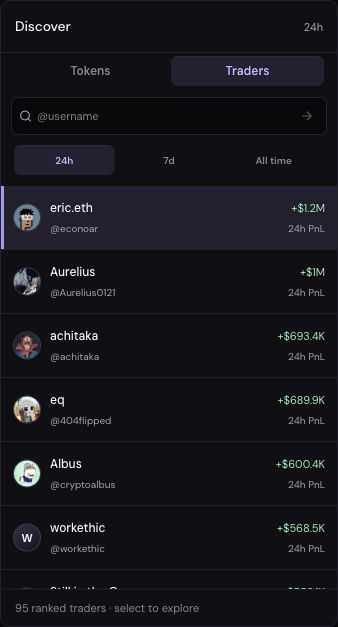
The screenshot illustrates discovery. The displayed traders and rankings change; they are not recommendations.
Separate realized results, open gains and account value
Realized profit or loss concerns positions that have been sold. Unrealized profit or loss estimates the change in positions still held. Open gains can change before a sale, and an estimated token price does not establish that the whole position can sell at that price.
Quickscope labels its Robinhood Profit & loss totals as Realized · indexed lifetime and Unrealized · open positions. Those totals are separate from the account-value chart and its selected time range. Transferred tokens may have an incomplete cost basis.
The account-value chart also includes transfers. A rising balance can reflect a deposit rather than a profitable trade. Before comparing two profiles, check that you are comparing the same measurement, network and period.
Look for concentration and consistency
Ask how much of the result came from one token or one short period. Review losing positions as well as winners, and check whether losses remain open while profitable positions have been sold.
For example, suppose two hypothetical profiles cover the same period and use comparable calculations:
- Trader A: 400 USDG of realized profit and 350 USDG of unrealized losses, with most gains from one token.
- Trader B: 120 USDG of realized profit and 20 USDG of unrealized losses, spread across several positions.
The larger realized number alone would favor A. Including the open positions changes the picture: the combined amounts are 50 and 100 USDG respectively, before any costs omitted from the example. Neither result establishes who will perform better next. The example shows why the headline number needs context.
A longer history gives you more observations to inspect, but it does not automatically cover different market conditions. Likewise, appearing in several ranking periods may reflect the same winning trade appearing in overlapping windows. Look at the trades behind the periods.
Compare holding times and exits
Where the history is available, follow a position from its buys through its partial or final sells. Does the trader hold for minutes, days or longer? Do they add to a position repeatedly? Do they close losing positions, or keep them open?
Repeated buys and partial sells make a single holding-time number less informative. Inspect the sequence rather than assuming the most recent buy and sell are a matched pair. If the available history cannot answer the question, keep that uncertainty in your comparison.
Short holding periods can make entry and exit differences especially relevant. Quickscope copies eligible buys. You manage exits through your configured take-profit and stop-loss rules, individual orders or manual sells, independently of the source trader’s sell activity. A trader's recorded exit is therefore not necessarily the exit your account will take. Review the exit and order guide before relying on a trader's historical holding period.
Check whether their trades fit your account
For the wallet-account workflow, Quickscope executes supported copies on Robinhood Chain using USDG. Observing FOMO activity on another chain does not mean every token has an eligible Robinhood route. A trader's total performance may include positions your account will never copy. The chain coverage guide explains that boundary.
Compare the assets, liquidity and typical source-buy sizes with your intended copy settings. A fixed Per-trade amount does not reproduce the trader's portfolio percentages. For example, using the same copy amount for both a small source buy and a much larger one gives those entries equal initial size in your account, even though the trader sized them differently.
If you copy several traders who buy the same token, consider their combined activity. Quickscope's token caps are shared across copied buys from different traders; they are not separate total budgets for each subscription. The settings checklist explains the amount controls.
Record what you know before enabling copies
- Which network and period does the evidence cover, and is any history missing?
- How much of the result is realized, unrealized or concentrated in one position?
- What do the available trade sequences show about holding times and exits?
- Which assets and source buys have supported execution routes?
- How will your fixed copy size, price controls, fees and independent exits differ from the trader's activity?
Once copying is enabled, compare confirmed source and copy transactions, including amounts, costs and skipped trades. Keep the trader's results separate from your own. If you cannot establish the history or route support you need, you can continue observing without enabling a subscription.
Browse FOMO traders, then use the setup guide when you are ready to configure eligible automatic buys.